Source: http://www.amazon.com
Slowly but surely, the long-predicted home entertainment convergence of TV and PC is becoming reality as more and more viewers get their weekly fix of Heroes and House from either online downloads or streaming video sources. And the DVD disc may soon be going the way of the dodo and rabbit ears as people turn to online video rentals and purchases as well as access video podcasts and video content from sources as varied as YouTube and Epicurious.
Until recently, you had to hunch over your laptop's screen or go to great cabling lengths to get your PC and HDTV to interact. But thanks to recent improvements in digital media accessories that link up with your HDTV, we can now sit back on the couch and watch content stored on or streamed from multiple PCs strewn throughout the house with the ease of using a single remote control.
We've rounded up some recent releases in two categories of digital media adapters, and we'll take a look at their major features.
- First, we'll look at products called Extenders, which work exclusively with PC running Windows Vista operating systems with Media Center capabilities and provide access to multimedia stored on a PC as well as some online video sources.
- Then, we'll examine Internet streamers, which don't require a specific OS but can access a wider range of streaming Web video content.
Extending your Windows Media Center
If you have a PC running either the Premium or Ultimate versions of the Microsoft Windows Vista operating system, a Windows Media Center Extender device can bridge the divide between your home office and your entertainment center by wirelessly broadcasting the multimedia stored on your PC to your TV in another room. In addition to video such as downloaded movies and TV shows and copies of your DVDs (in DivX and XVid formats) as well as home movies, you can also stream tunes and podcasts from your digital music library, present photo slideshows, and watch live TV and use DVR functions such as pausing live programming and timeshifting (if your PC has a TV tuner)--all using a single remote control. And with the Wi-Fi networking of an Extender device, you can keep your PC where it belongs in your home office and not cluttering up your living room. Additionally, Microsoft has partnered with several online streaming video sites to provide a variety of content for Windows Media Center users, including FOX Sports, kids programming from Nickelodeon, and downloadable TV episodes from Showtime Networks--all of which can be streamed and controlled by an Extender device. HP, Linksys, and Samsung are just a few of the companies offering Windows Media Center Extenders, and each of their devices bring a few extras--from integrated hardware to more online video download/streaming services--in addition to those standard features noted above.
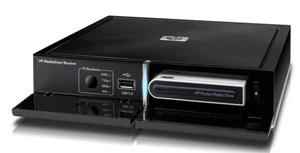
HP X280N MediaSmart Connect
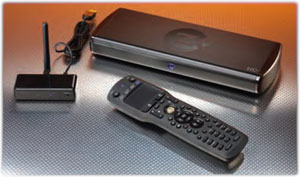
In addition to its Media Center Extender capabilities, the stylish, piano-black
HP X280N MediaSmart Connect will fit in with similarly Zen-styled
HP Pavilion desktops and
MediaSmart and Media Vault home servers. But HP hardware isn't a requirement for adding an X280N to your home media set-up. While you can connect to a PC via Fast Ethernet or quad-mode Wi-Fi (802.11a,b,g, and n), the X280N also provides access to media files stored on an external USB hard drive or on an optional
Pocket Media Drive (which can be inserted into its own bay). And HP boasts that the MediaSmart Connect will automatically aggregate and display content from all connected PCs and media servers in your home network--perfect for converging all your family's media in one location. You can also rent and purchase movies from the CinemaNow online catalog (with its selection of thousands of films) directly from the X280N using the remote control (downloads are stored on your PC). Additionally, you can view slideshows from your images stored on the Snapfish photo sharing site and listen to a vast selection of online radio stations from Live365.
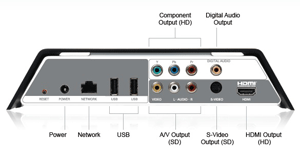
- Networking: Draft-N Wi-Fi (802.11a,b,g, and n), Fast Ethernet (10/100)
- Expansion: Pocket Media Drive bay, 2 USB ports (front and back)
- Video output: HDMI, component
- Audio output: Analog stereo (left/right), optical digital audio, plus uncompressed audio carried over HDMI
Order now at amazon astore? http://astore.amazon.com/thebesofeveun-20/detail/B001AHLODY/102-6612896-8134530Linksys Media Center Extender with DVD
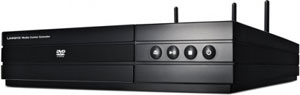
If you've got an abundance of hard drive space, you can store digital copies of your DVD library on your PC (or on an external hard drive or networked home server) and stream them to your TV using a Media Center Extender. But if you lack the storage capability or don't want to deal with hours of encoding your DVDs, the
Linksys DMA2200 Media Center Extender might be just right for you. While Media Center Extenders are great for playing a wealth of media files stored on hard drives, they don't stream DVD playback. To get around this, Linksys integrates a DVD player that upscales the standard definition video from a standard DVD disc to 720p, 1080i and 1080p high definition video. It also leverages Linksys' strong suit of wireless networking, with the dual-band Draft-N Wi-Fi (2.4 GHz and 5 GHz) capabilities. However, it doesn't offer any additional online download or streaming services.
- Networking: Draft-N Wi-Fi (802.11b, g, and n), Fast Ethernet (10/100)
- Expansion: USB port for service only (not compatible with external hard drives)
- Video output: HDMI, component, composite, S-Video
- Audio output: Analog stereo (left/right), optical digital audio, plus uncompressed audio carried over HDMI
Order now at amazon astore?http://astore.amazon.com/thebesofeveun-20/detail/B000XQONSG/102-6612896-8134530Internet Streamers
For those who don't have Windows Vista Media Center capabilities, there are several devices that enable you to broadcast multimedia files saved to your PC's hard drive. But more than just serving up localized files, these devices can also deliver HD-quality TV shows and movies that are streamed from the Web--enabling you to enjoy them on your home's HDTV rather than on your laptop's screen.
Sling Media SlingCatcher SC100-100 Universal Media Player for TV
One of the most anticipated Internet streamers is the
SlingCatcher from Sling Media, which has made a name for itself with its line
Slingbox devices that redirect the broadcast from a connected TV to the computer of your choice--wherever on the globe that TV might be. The SlingCatcher, however, streams media from one TV (with a connected Slingbox) in your home to another, enabling you to eliminate extra set-top boxes or having to call the cable company to add wiring to your home. But more than just offering placeshifting capabilities, the SlingCatcher also functions as a media extender for files downloaded to your PC. And it offers the unique ability to broadcast Internet-based videos from services such as YouTube and Hulu. It comes with three built-in applications, including SlingPlayer for TV for "slinging" programming from one TV to another and SlingSync, which enables you to synchronize files from your PC to a USB flash or hard drive connected to the SlingCatcher's USB port. The third application, SlingProjector, works like a Web browser and automatically detects compatible windows within a Web page that you can select to "project" just the video to your HDTV in full screen. Additionally, you can select other portions of the browser to be shown on the TV (for example, images for a slideshow or a portion of a news or sports Web site that auto-updates). Note that the SlingCatcher is not Wi-Fi-enabled. The SlingCatcher features a standard Ethernet jack to connect to the home network either directly or via SlingLink Powerline Ethernet adapters. Also, Mac users will be able to utilize the SlingPlayer and SlingSync functions, but not the SlingProjector as that requires Windows XP SP2 or Windows Vista.
- Networking: Fast Ethernet (10/100)
- Expansion: 2 USB
- Video output: HDMI, component, composite, S-Video
- Audio output: Analog stereo (left/right), coaxial digital audio, plus uncompressed audio carried over HDMI
Order now at amazon astore?
http://astore.amazon.com/thebesofeveun-20/detail/B000VXD2S8/102-6612896-8134530ZeeVee ZvBox
In addition to broadcasting multimedia files stored on your PC, the
ZeeVee ZvBox can deliver Internet video content to your HDTV from a Web browser via a unique connection. Rather than Wi-Fi or Ethernet networking, the ZvBox uses your home's coaxial cable TV wiring to create a private high-definition TV channel called Zv, which is then localcasted to all HDTVs in the home connected to the coaxial wiring. The ZvBox essentially transmits whatever would be showing on your PC's monitor to your HDTV. This enables you to access streaming movies and TV shows found at such Internet portals as the major television networks such as ABC.com, Hulu, Joost, Netflix, and even Amazon's Video on Demand. Additionally, you can view uploaded and viral videos from sites such as YouTube and DailyMotion. And you can even start, stop and resume your computer's DVD player from any HDTV using the included ZvRemote, which also provides full control of your computer from anywhere in the house, including cursor control. Note that because the ZvBox requires a bit more set-up than just connecting an Ethernet cable--for instance, you'll need to access where your cable service enters your home to set up the private channel. But once it's set up, you can watch any multimedia, regardless of physical or digital format, on any TV in your home. It requires Windows XP SP2 or Windows Vista (not Mac-compatible).
- Networking: In-home coaxial cable wiring
- Expansion: 1 USB
- Video output: VGA
- Audio output: USB connection from PC to ZvBox
Order now at amazon astore?
http://astore.amazon.com/thebesofeveun-20/search/102-6612896-8134530?node=40&keywords=ZeeVee+ZvBox&x=11&y=16&preview=
Sony DMX-NV1 Bravia Internet Video Link
While it's not Wi-Fi-enabled, the
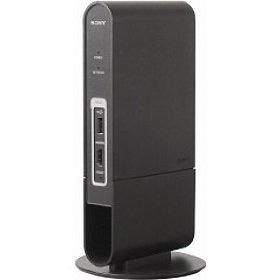
Sony DMX-NV1 Bravia Internet Video Link does connect simply to your home network via Ethernet to provide on-demand widescreen access to online videos from a wide variety of partners, including YouTube, DailyMotion, CBS, Yahoo!; Sports Illustrated, FEARnet, and Epicurious. You also get access to a personalized Yahoo! homepage that keeps you up-to-date on national news, local weather and traffic.
Additionally, Sony recently announced that access to the Amazon Video On Demand service has been added, enabling you to purchase or rent movies and TV shows via your Sony Bravia HDTV just as you would on your PC. When a title is ordered, it is automatically added to your Amazon Video On Demand "Your Video Library," providing easy access to purchased and rented content. A backup version can also be found in the library, which is accessible from the DMX-NV1's user interface or on Amazon.com.
This compact unit (about the size of a VHS tape) can stand on its own or be mounted on the back of a Sony Bravia HDTV. And it works solely with Bravia models that offer the Digital Media Extender (DMeX) feature. It integrates with the easy-to-use Xross Media bar (XMB) graphical menu navigation system, and it features HDMI and USB pass-through inputs (enabling you to connect other peripherals to the HDTV via the DMX-NV1).
- Networking: Fast Ethernet
- Expansion: USB (pass-through)
- Video output: HDMI (pass-through)
- Audio output: HDMI (pass through)
Order now at amazon astore?
http://astore.amazon.com/thebesofeveun-20/detail/B000RFURG0/102-6612896-8134530


No comments:
Post a Comment